
Ship every FiveM asset from one browser tab.
Retexture liveries, generate meta, scan resources, and package streaming-ready builds — one connected workspace. Zero installs, zero tool-switching.
Free to start — no card required.
Just released
New Tools in The Workshop
0.0K+
creator community
0
browser-native tools
0.0K+
projects completed
0.0K+
hours saved
Tools
23 tools, one production line.
Preview, generate, edit, scan, package, render — every FiveM asset workflow runs in the browser.
Paint Booth
Upload textures, tweak colors, adjust lighting, and preview your livery on 3D models in real time. Supports PSD, PDN, XCF file formats for live editing.
UV Studio
Render the UV map template for models that are already mapped but missing their original template.
Blink Lab
Design lightbar flash patterns on an 8-color grid, preview live, and export sequences as binary or decimal.
3D BlinkLabNew
Design a siren pattern and watch it play on your own .yft in 3D. Shares projects with Blink Lab and exports carcols-ready sequences.
Modkit ViewerNew
Preview kit parts per category, toggle extras and open doors on your own vehicle resource. Files never leave your device.
Chevron BuilderNew
Generate professional rear warning chevrons for Fire, EMS, DOT, tow, and emergency vehicles with custom colors, angles, reflective preview, and UV-aware placement.
Paint Booth Studio
Edit liveries on a Photoshop-style layered canvas while seeing the result live on a 3D vehicle preview.
Easy Meta
Generate vehicles.meta, handling.meta, carvariations.meta, and carcols.meta files with a guided editor and exports.
Creator ConvertNew
Convert DDS textures, create DDS files from images, and extract selected YTD textures into a ZIP archive.
Handling DiffNew
Compare two handling.meta files field by field, with a header count that never rounds a real change away to "Identical."
EUP Viewer
Upload YDDs, tweak colors, and preview your textures on 3D models in real time.
Ink LabAINew
Make a custom MP freemode tattoo from a prompt, a reference or your own PNG, preview it on the body, and export a drop-in FiveM addon.
Embroidery ToolAINew
Upload logos, badges, icons, or patch art and convert them into stitched embroidered PNG patches with real transparent backgrounds.
Badge MakerAI
Generate crests, badges, and emblems for liveries, departments, and crews.
Addon EUP Creator
Convert EUP clothing files between single-player, non-addon FiveM, and addon FiveM folder structures.
Asset ArtAI
Type any item name and generate a transparent, game-ready inventory icon for your FiveM server.
Model ForgeAI
Generate 3D models from text prompts or reference images using Tripo AI. Output is a GLB file ready for Blender, UV Studio, or any FiveM-ready workflow.
PackBench
Drop .yft, .ytd, and meta files to generate a correctly structured FiveM resource ZIP with fxmanifest.lua.
Code Smith
Scan zipped resources for loop abuse, missing Wait() calls, heavy events, and potentially unused assets.
Code VisualizerNew
Map FiveM scripts into readable command, event, export, function, and trigger flows with an embedded code editor.
Script DocsNew
Generate README-ready docs from resource commands, exports, events, dependencies, and config files.
Resmon ReportNew
Turn a resmon or txAdmin paste into a ranked report of which resources are actually costing you frame time.
Coming Soon
More tools are in development.
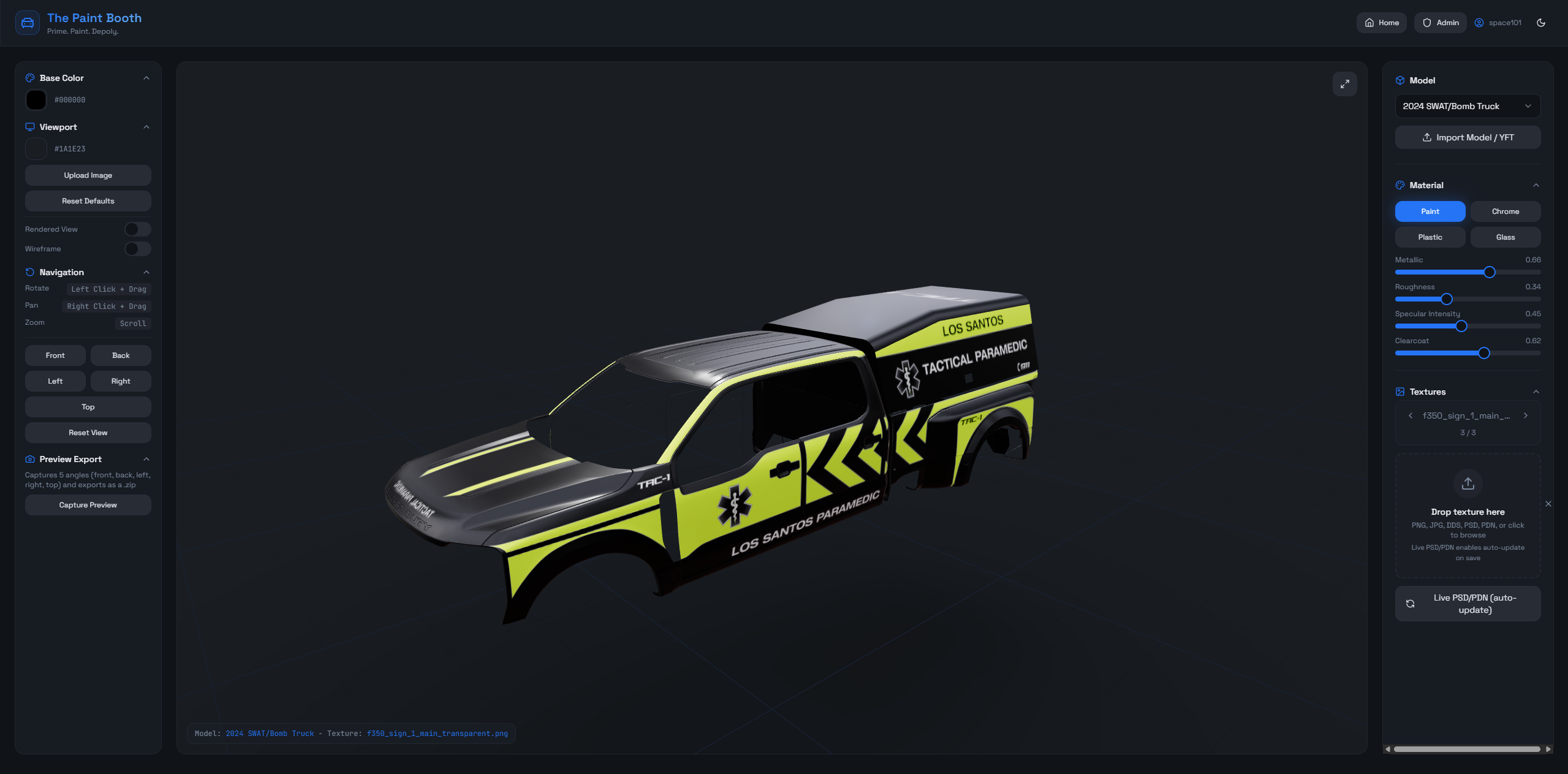
Paint Booth
Upload textures, tweak colors, adjust lighting, and preview your livery on 3D models in real time. Supports PSD, PDN, XCF file formats for live editing.
- 3D Livery Viewer
- Exports .psd files
- Exports .pdn files
Shared library
One cloud library. Twenty-three tools wired into it.
Save once and every tool can read it. AI generations, paint passes, packed builds — they all live in the same project, so each step picks up where the last left off.
Who it is for
Built for the role you actually do.
Vehicle devs, server owners, livery and EUP creators, resource builders — same workspace, different starting points.
Vehicle developers
Preview liveries, recover UVs, configure lighting, and generate GTA V vehicle meta without bouncing between local utilities.
Server owners
Validate resources before they land on your server. Package consistently. Audit script quality before it ships.
Livery and EUP creators
Move faster from texture edits to browser previews, then test clothing and vehicle visuals before handoff.
Resource and weapon developers
Scan scripts, clean asset bundles, package exports, and review weapon texture work before it hits the server.
The Future of Asset Creation
Less tool switching. More shipping.
Stop chaining local utilities and Discord-shared scripts. Run the same work in one browser tab.
Before
Local utility chain.
After
Connected browser workspace.
Free tools
No account. No subscription. Runs in your browser.
Server-owner utilities for the decisions you make before you buy a tool — config order, spawn codes, id collisions, download size.
Pricing
Pick the toolkit that matches your workflow.
Annual saves you two months. Switch tiers anytime.
Cancel anytime from your Shopify account. Switch tiers whenever your workflow changes.
Check out with the same email you’ll use for your Workshop account — that’s how your tools unlock.
FAQ
Clear answers before you subscribe.
Billing, access, and what's included. No marketing fog.
What is The Workshop?
A browser-based workspace for FiveM creators. Tools for liveries, EUP, vehicle meta, scripts, and resource packaging. No installs. One subscription.
Is anything free to try?
Yes. Eight FiveM utilities — server.cfg Builder, Spawn Code Finder, JOAAT hashes, and more — are free with a free account. Paint Booth and Paint Booth Studio have demos you can try without signing up. The rest of the toolset requires a subscription.
Can I generate vehicle meta files?
Yes. EasyMeta generates vehicles.meta, handling.meta, carvariations.meta, and carcols.meta from guided fields.
Does this replace local GTA V vehicle tools?
For most workflows, yes — livery preview, UV extraction, light pattern editing, meta generation, and packaging all run in the browser. Niche local-only utilities are still better at the edges.
Can I build a complete FiveM resource?
Yes. PackBench takes your model, texture, and meta files and outputs a structured resource ZIP with fxmanifest.lua.
How does billing work?
Subscriptions run through Shopify. Manage, switch, or cancel from your Shopify account.
I subscribed but it's not showing on my account.
Access links by email. Make sure your Workshop account uses the same email you checked out with — if they differ, sign in (or sign up) with the purchase email and your subscription will appear. Still stuck? Reach out and we'll link it for you.